Stay in the loop!
Get the latest industry insights delivered straight to your inbox
Temperature sensors only protect food if your team trusts the alerts. Here's how smarter thresholds, alert delays and escalation keep multi-location kitchen teams responding instead of tuning out.
TransAct
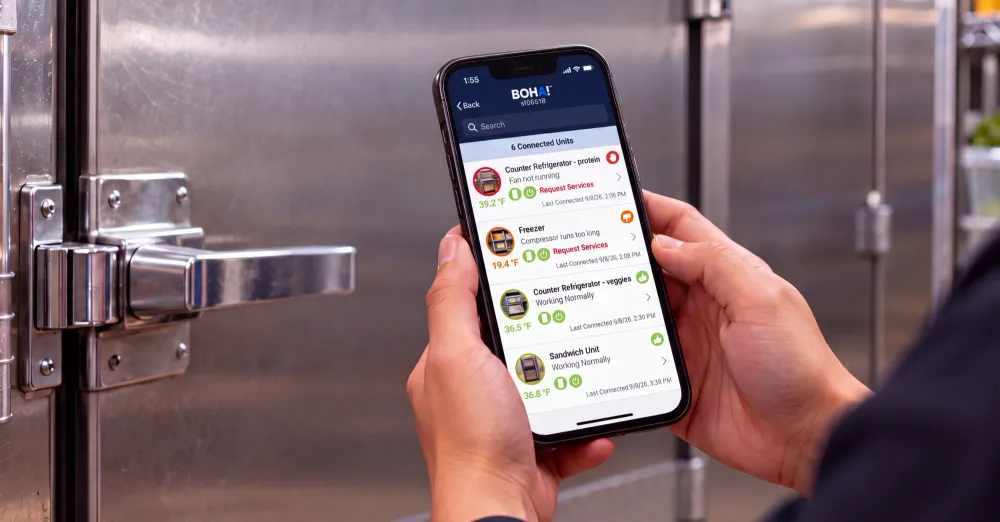
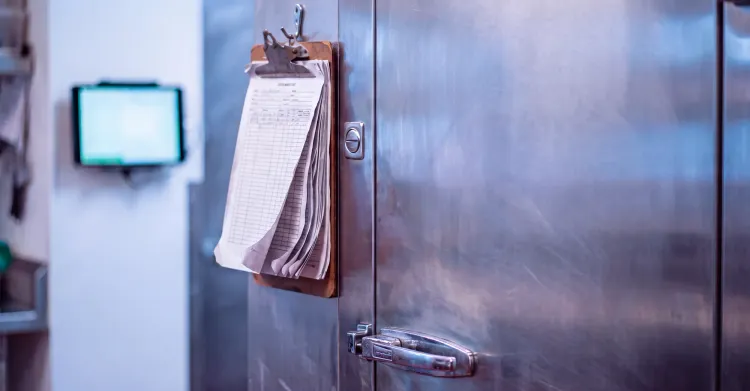
Continuous temperature monitoring uses wireless sensors to record temperature, and often humidity, inside coolers, freezers and walk-ins around the clock, then alerts the team when a reading moves outside an acceptable range. For multi-location operators, it replaces clipboard checks that capture a few moments a day with a record that covers every hour, including the overnight hours when nobody is in the building.
The sensors are rarely the weak point. A kitchen that receives dozens of temperature notifications a week, most caused by a door held open during a delivery, learns quickly that the phone buzzing usually means nothing. Eventually a compressor actually fails, and that alert gets the same glance as the forty before it.
That pattern has a name. Alarm fatigue is the desensitization that sets in when people receive more alerts than they can meaningfully act on, especially when the alerts don't signal how urgent they are. Hospitals have studied it for more than a decade. The Agency for Healthcare Research and Quality's primer on alert fatigue describes one academic hospital where physiologic monitors across 66 ICU beds generated more than 2 million alerts in a single month, about 187 per patient per day. The pattern holds for temperature monitoring specifically. A Rutgers doctoral study of a multi-unit health system's remote temperature monitoring found about 11,000 environmental excursion alerts a month, with only 22% of them addressed. When nearly every alarm turns out to be routine, people stop treating any of them as urgent, and a multi-location kitchen operation is exposed to the same dynamic.
Foodservice is starting to name the problem directly. In April 2026, NACS hosted a session on avoiding alarm fatigue in hot and cold holding monitoring with food safety researchers from Rutgers and NC State, focused on how frequent alerts desensitize staff and how pathogen growth models can inform better alarm thresholds.
This article assumes sensors are already installed or about to be and is focused on how temperature alarms are configured, prioritized, and routed. For background on the hardware, see our coverage of remote temperature monitoring for foodservice and refrigeration monitoring.
Alarm fatigue usually grows out of reasonable decisions made during setup, when the goal is making sure nothing gets missed. Five patterns show up across most multi-unit rollouts.
The fastest way to configure a cooler temperature monitoring system is to set a single limit, such as alerting whenever any unit reads above 41°F, the cold holding temperature in the FDA Food Code. That number is the right regulatory line for food, yet applied to every piece of equipment it creates noise. A reach-in on a busy line opens hundreds of times a day, and its air temperature behaves very differently from a walk-in freezer in a back hallway. A single static limit can't tell normal service from a real problem.
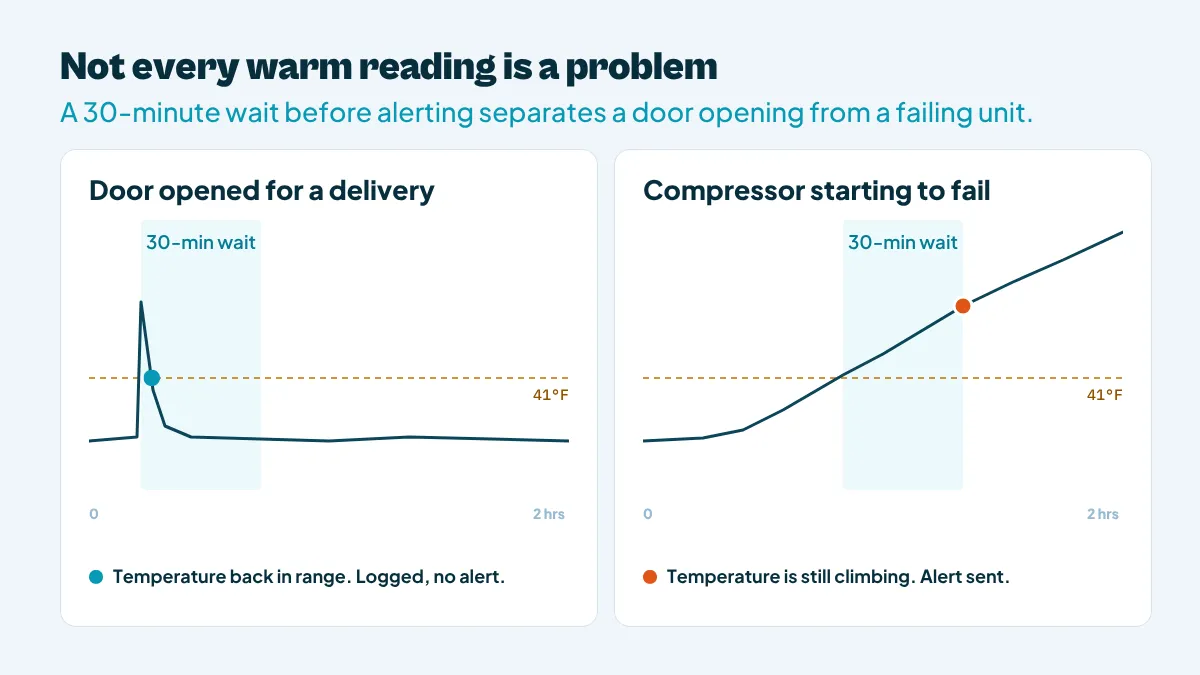
A door propped open for two minutes during a produce delivery and a compressor that has been losing ground for three hours can both produce an out-of-range reading. Operationally they have almost nothing in common. The first recovers on its own once the door closes. The second gets worse until someone intervenes, and every hour of delay puts more product at risk. When an automated temperature monitoring system alerts on any single reading above the limit, both events look identical on a manager's phone.
Copying the general manager, the kitchen manager, the area director and the food safety team on every alert feels like the safe choice. In practice it spreads responsibility so thin that nobody owns the response. Each person assumes someone closer to the store is handling it, and the people who could act learn to scroll past a channel that's mostly irrelevant to them.
An effective alert has a lifecycle. It fires, someone acknowledges it, and if nobody does within a set window, it moves to the next person in line. Many setups stop after the first step. An alert goes out once, sits unread in an app overnight, and the first sign of trouble is a warm walk-in at opening.
Door openings cluster around deliveries, prep and meal periods, so threshold-only alerts cluster there too, landing when teams have the least attention to spare and muting the app is most tempting.
The obvious cost is a missed failure: discarded inventory, an emergency service call and a scramble to rebuild prep before service. Deciding what product can be kept depends on knowing exactly when it went above 41°F. The temperature danger zone guide covers those time and temperature limits in detail.
The less obvious cost shows up in the records. A monitoring log full of alerts that were never acknowledged, with no documented corrective action, tells an inspector or auditor that the operation knew about a deviation and didn't respond. Our guide to temperature logs that survive an audit covers what inspectors look for in those records.
Staffing raises the stakes. Nearly three-quarters of operators plan to hire this year but expect difficulty finding experienced managers, according to the National Restaurant Association's 2026 State of the Restaurant Industry outlook, so fewer experienced people are left to sort through alerts.
Documentation expectations are rising too. The FDA's 2026 Food Code, released September 17, adds a defined food safety management system (FSMS) and a new section, § 8-201.15, describing when an establishment must have one. The Food Code is a model code that takes effect only as states and localities adopt it. Still, it signals that regulators increasingly expect monitoring and corrective action to be written, repeatable procedures rather than habits that live with one experienced manager.
Four design principles do most of the work.
A reach-in on the line can tolerate a short rise during a lunch rush that would be a real warning sign in the same unit at 3 a.m., when nobody should be opening its door. Setting limits per equipment type, with allowances for known busy windows and defrost cycles, removes most nuisance alerts without loosening food safety standards. The same thinking applies to humidity. A slow, steady rise in a walk-in can point to a worn door gasket or a door that isn't sealing, often before air temperature moves much, so it's worth a scheduled check rather than an urgent page.
A short excursion that recovers within minutes rarely needs a push notification. A reading that stays above the limit for 30 minutes, or keeps climbing with no door activity, almost always does. Building a time delay and a trend check into each temperature alarm is the single most effective way to separate door-open events from equipment failures. Sensor placement helps too. A probe placed near the door or the evaporator fan reacts to every opening, while one positioned where product actually sits, or housed in a buffered product-simulating enclosure, tracks something much closer to food temperature and ignores brief swings in air temperature.
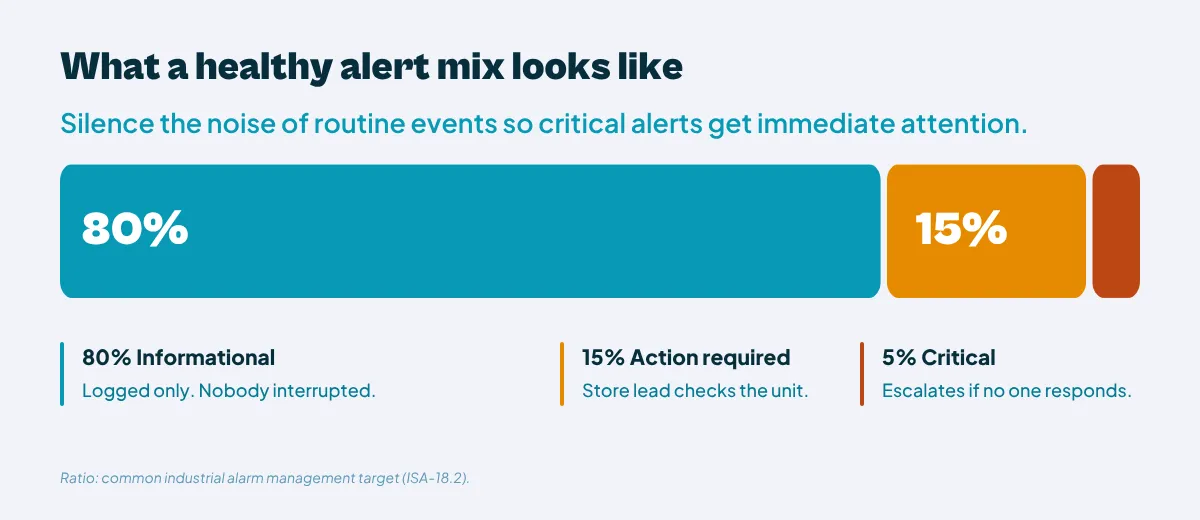
A simple three-tier model covers most kitchens:
Industrial plants have used this approach for years. Alarm management guidance built on the ISA-18.2 standard, summarized in Emerson's alarm management benchmarks, cites a commonly used target of roughly 80% low-priority, 15% medium-priority and 5% high-priority alarms, so the rare high-priority alarm stands out. A kitchen doesn't need a control room, but the same ratio is a useful check. If most of your alerts are tagged urgent, the tiers aren't separating anything.
Each role needs a different view of the same data:
| Role | What reaches them in real time | What they review periodically |
|---|---|---|
| Kitchen and shift leads | Action-required and critical alerts for their own store's equipment | Shift summary of informational events |
| Regional and field leaders | Critical alerts that weren't acknowledged in time | Patterns across their stores, such as a unit with repeated deviations that needs maintenance |
| Headquarters, food safety and QA | Rarely anything in real time | Portfolio-level trends, response times and corrective action completion across all locations |
Platform views like BOHA! Control Center are built for that headquarters and field perspective, giving visibility across locations instead of another feed of store-level notifications.
Consider an illustrative example: a casual dining group with 80 locations running walk-in cooler temperature monitoring across every store.
At 6:40 p.m., in the middle of dinner service, a line cook props the walk-in door open for 90 seconds to bring in a produce delivery. The air temperature rises a few degrees and recovers within five minutes. Under a single-threshold setup, that event would push an alert to the kitchen manager, the general manager and the area director. With duration-based tiers, it logs as informational and shows up in the shift summary. Nobody leaves the line.
At 2:15 a.m., the same walk-in's compressor starts to fail. The temperature climbs steadily with the door closed and passes the critical threshold after 30 minutes. The alert goes to the on-call kitchen lead. The store is closed and nobody acknowledges it within the set window, so it escalates to the regional manager, who calls the refrigeration vendor and arranges for the opening crew to move product to a backup unit.
By morning, the food safety team at headquarters sees one critical event, the response time and the corrective action documented against it, alongside every other location's overnight status. The sensors and equipment are the same in both setups. The difference is that the team trusted the 2:15 a.m. alert because the 6:40 p.m. one never interrupted them.
Most operators don't need new sensors to fix alarm fatigue. They need to review the rules sitting on top of the sensors they already have. These questions surface most of the problems:
It also helps to ask store teams which notifications they've stopped reading, since frontline staff usually know.
Once changes are in place, track two numbers by location each month: the share of alerts that led to a documented action, and the median time to acknowledge a critical alert. Both should improve together. Total alert count can fall while response gets worse, so it's a weak measure on its own.
If the answers point to flat thresholds, broadcast routing and no escalation, the fix is configuration and process rather than more hardware.
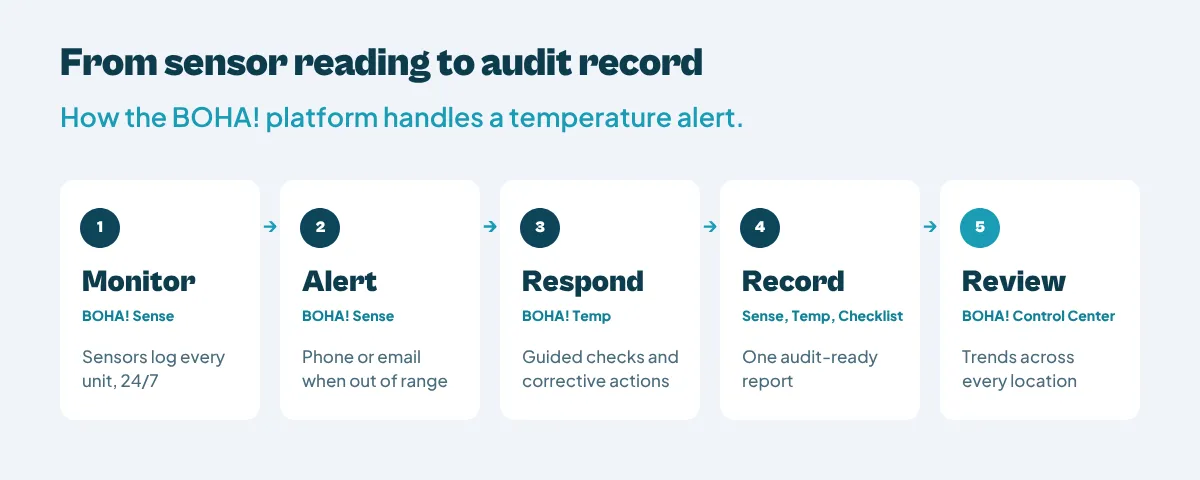
The practices above apply to any monitoring setup. In the BOHA! platform, the work is split across connected apps, each with a defined job, so an alert and everything that follows it end up in the same place:
For more on how those records come together, see digital HACCP records that prove compliance. For the broader program, the Food Safety & Compliance overview shows how monitoring fits alongside labeling, checklists and HACCP reporting, and operators focused on product loss can see how monitoring supports waste and spoilage reduction.
If you're planning or tuning temperature monitoring across dozens or hundreds of locations, talk with the BOHA! team about how alerts, records and corrective actions come together in one platform.
Continuous temperature monitoring uses wireless sensors to record temperature, and often humidity, inside refrigeration and storage equipment around the clock. The system stores every reading automatically and sends alerts when conditions move out of range. It replaces periodic manual checks with a complete record that includes nights and closed hours.
Alarm fatigue happens when kitchen teams receive so many temperature alerts, most of them routine, that they start ignoring or silencing notifications. It usually comes from static thresholds, alerts that fire on single readings, and notifications sent to people who can't act on them. The danger is that a real equipment failure gets the same lack of attention as a routine door opening.
Add a time delay and trend check so brief, self-correcting excursions don't trigger notifications, set thresholds per equipment type, and sort alerts into informational, action-required and critical tiers. Nothing is switched off. Routine events are still logged and reviewed in summaries, while sustained deviations reach the right person quickly and escalate if they go unacknowledged.
The on-shift lead at that location should receive action-required and critical alerts first, because they can physically check the unit. Regional or field leaders should receive critical alerts only if nobody acknowledges them in time. Headquarters and food safety teams are usually better served by periodic reports on trends and response times than by individual notifications.
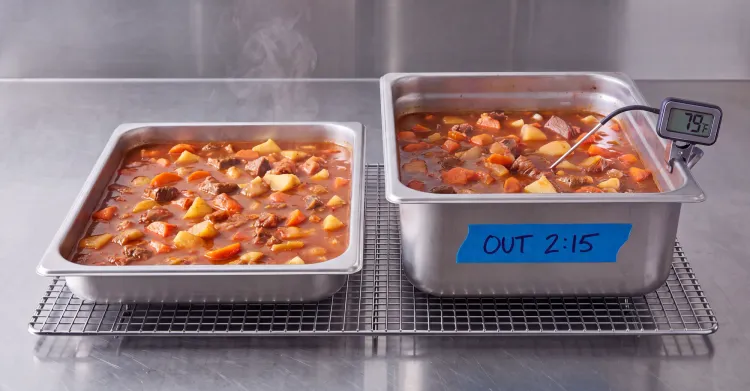
The alert should go to a designated on-call person and escalate automatically if it isn't acknowledged. The responder should stabilize the unit or move product to backup refrigeration, then determine how long product was above 41°F before deciding whether to keep or discard it. The corrective action, timing and decision should be documented against the alert so the record is complete for audits.
Track the share of alerts that result in a documented action and the time it takes to acknowledge critical alerts, by location. A healthy system sends fewer alerts overall, but a higher share of them lead to action and critical alerts get acknowledged quickly. If acknowledgment times are rising, staff are still tuning alerts out.
Not entirely. Automated sensors monitor equipment conditions continuously, including overnight. Manual probe checks confirm the temperature of the food itself during cooking, cooling and hot or cold holding, and they capture corrective actions taken by staff. Most food safety programs use both, with sensors covering equipment and guided digital checks covering food.
Get the latest industry insights delivered straight to your inbox
Browse